Question

Display availability without allowing booking.

  • December 19, 2025
  • 6 replies
  • 121 views

Hello All!


I would like to display my availability without allowing booking.

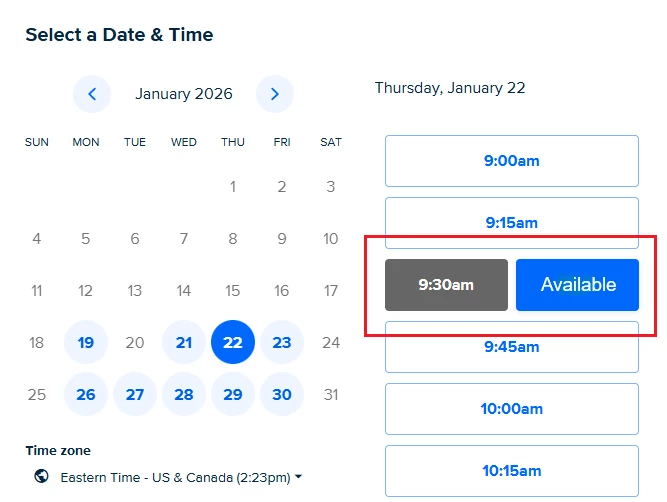
I want to disable or hide the "NEXT" button booking option while still showing my schedule. 

The "NEXT" button is shown after a client chooses a day on the booking calendar.

I can add CSS and PHP functions in WordPress if this helps find a solution.
6 replies

  • New Community Member
  • December 21, 2025

Hey ​@Tom66160 -

The Calendly booking widget (iframe) doesn’t support this feature; however, you can use Calendly’s API to show your availability without allowing the invitee to book.

Specifically, you can use the “List Event Types Available Times” endpoint (//developer-calendly-com.screenshare.banktechpr.app/api-docs/6a1be82aef359-list-event-type-available-times) to display your availability on your site without allowing the invitee to book.


  • Author
  • New Community Member
  • December 24, 2025

Thanks Calforce50652,


I had seen that already and determined it is not worth the effort.

It describes limits that makes it useless:

Date range can be no greater than 1 week (7 days).


In WordPress, I can add: 

  • CSS
  • PHP
  • Embed
  • HTML


All that needs to happen is to make the “Next” button not work.

Or better yet, have it say ”Available”.


  • New Community Member
  • December 24, 2025

Hey ​@Tom66160 -

An alternative solution would be to use a tool like Cloakist (https://cloak.ist/calendly) to host the Calendly scheduling page. This option allows you to inject custom CSS, JS, and HTML into the scheduling page, which would allow you to disable the “Next” button / change the text.

Below is a video tutorial of how to change the Calendly scheduling page’s CSS with this option:


  • Author
  • New Community Member
  • December 28, 2025

Thanks again Calforce50652,


Defiantly not pointing my domain name anywhere else and paying more for it 😓


  • New Community Member
  • January 19, 2026

Hey ​@Tom66160 -

I know this is a late reply, but I wanted to let you know that this feature is now available in Calendly Components - a tool that uses Calendly’s API to add features to the normal embed code.


  • Author
  • New Community Member
  • July 8, 2026

I found a temporary, incomplete and mostly useless workaround for WordPress.


WordPress

I embed calendly code in Avada element on website.

I set link in element so if you click anywhere on element, containing calendar, it takes you to a intake form.


You cannot use:

  • Available time
  • Next month
  • Or any of the normal features of calendly


Its hard to believe that so few people don't care about clients being able to see availability without booking.


If a client can’t schedule on my available date I do not want them booking or filling out form.
If we can’t schedule there is no point in wasting our time.