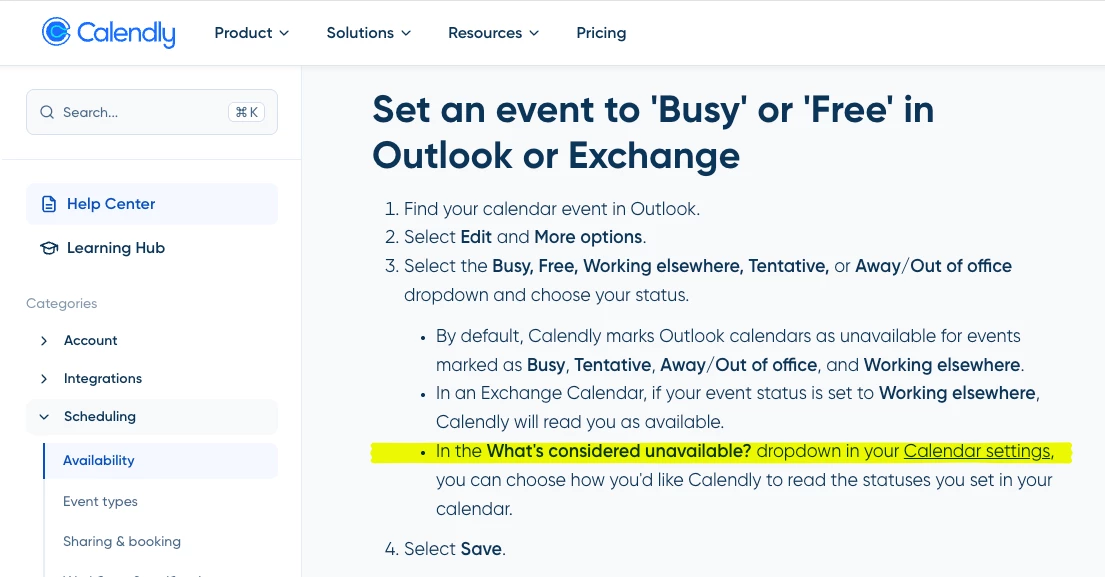
Calendly used to allow me a setting to treat ALL my Outlook Tentative meetings as “Available” for someone to schedule a Calendly meeting with me. This was great! I set all my Outlook meetings that are “low priority; attend if you can” to Tentative. And Calendly would treat all of them as Free so that external people could select that time and “book over” my internal meeting. Perfect! 😃 And there is a Help Center topic that suggests I can still do that (see screenshot of 2026-07-08 in USA).
But now it seems I have to individually set meetings by name in order for Calendly to book over them. Or else I need to set my Outlook RSVP to “Free” which confuses the internal meeting organizers: am I attending or not?
Is there still a way to indicate “Treat Tentative meetings as Free” for ALL my Outlook meetings in Calendly? If not, this is a significant downgrade to my workflow. 😥